Sunday, January 28, 2018

WAS concepts : node, cell ,cluster


A good explanation of cell node and cluster is provided in the below given link 

https://itdevworld.wordpress.com/2009/05/03/websphere-concepts-cell-node-cluster-server/

Below is the diagrammatic representation of a WAS having clustered environment. 


Tuesday, February 18, 2014

Struts 1.x Basic Flow

Struts Flow-How Struts Works?
Struts Flow start with ActionServlet then call to process() method of RequestProcessor.
Step 1. Load ActionServlet using load-on-startup and do the following tasks.
Any struts web application contain the ActionServlet configuration in web.xml file. 
On load-on-startup the servlet container Instantiate the ActionServlet . 
First Task by ActionServlet : The ActionServlet takes the Struts Config file name as an init-param. 
At startup, in the init() method, the ActionServlet reads the Struts Config file and load into memory. 
Second Task by ActionServlet : If the user types http://localhost:8080/app/submitForm.do in the browser URL bar, the URL will be intercepted and processed by the ActionServlet since the URL has a pattern *.do, with a suffix of "do". Because servlet-mapping is 
 
action
*.do


Third Task by ActionServlet : Then ActionServlet delegates the request handling to another class calledRequestProcessor by invoking its process() method.

action
org.apache.struts.action.ActionServlet

config
/WEB-INF/struts-config.xml

1


action
*.do

Step 2. ActionServlet calls process() method of RequestProcessor.
The RequestProcessor does the following in its process() method:
a) The RequestProcessor looks up the configuration file for the URL pattern /submitForm (if the URL is http://localhost:8080/app/submitForm.do). and and finds the XML block (ActionMapping).
ActionMapping from struts-config.xml
type="com.techfaq.emp.EmpAction"
name="EmpForm"
scope="request"
validate="true"
input="EmpForm.jsp">
path="success.jsp"/>

b) The RequestProcessor instantiates the EmpForm and puts it in appropriate scope – either session or request.
The RequestProcessor determines the appropriate scope by looking at the scope attribute in the same ActionMapping.
c) RequestProcessor iterates through the HTTP request parameters and populates the EmpForm.
d) the RequestProcessor checks for the validateattribute in the ActionMapping. 
If the validate is set to true, the RequestProcessor invokes the validate() method on the EmpForm instance. 
This is the method where you can put all the html form data validations. 
If Validate fail the RequestProcessor looks for the input attribute and return to JSP page mentioned in input tag. 
If Validate pass goto next step. 
e) The RequestProcessor instantiates the Action class specified in the ActionMapping (EmpAction) and invokes the execute() method on the EmpAction instance.
signature of the execute method is
public ActionForward execute(ActionMapping mapping,
ActionForm form, HttpServletRequest request,
HttpServletResponse response) throws Exception
{
//your logic
return mapping.findForward("success");
}
f) In return mapping.findForward("success") 
RequestProcessor looks for the success attribute and forward to JSP page mentioned in success tag. i.e success.jsp. 
In return mapping.findForward("failure") 
RequestProcessor looks for the failure attribute and forward to JSP page mentioned in failure tag. i.e. failure.jsp

Saturday, June 22, 2013

Using URL Resources WAS


If one needs to dynamically update the resources on a running applications the below link would definitely help in how to achieve this effect.

http://www.ibm.com/developerworks/websphere/library/techarticles/0502_botzum/0502_botzum.html

Sunday, April 14, 2013

Java- J2EE Design Patterns


Definition of Design Patterns


design pattern is a general reusable solution to a commonly occurring problem within a given context in software design. A design pattern is not a finished design that can be transformed directly into source or machine code. It is a description or template for how to solve a problem that can be used in many different situations. Patterns are formalized best practices that the programmer must implement themselves in the application.

Extracts of the exact classification of Design Patterns


Design patterns were originally grouped into the categories: creational patternsstructural patterns, and behavioral patterns, and described using the concepts of delegationaggregation, and consultation. For further background on object-oriented design, see coupling and cohesioninheritanceinterface, and polymorphism. Another classification has also introduced the notion of architectural design pattern that may be applied at the architecture level of the software such as the Model–View–Controller pattern.

Link of important design patterns with examples http://www.javacamp.org/designPattern/index.html


Design patterns reside in the domain of modules and interconnections. At a higher level there are architectural patterns that are larger in scope, usually describing an overall pattern followed by an entire system.


Wednesday, July 21, 2010

Horizontal Scaling Topology


Horizontal scaling topology

Horizontal scaling exists when there are members of an application server cluster on multiple physical machines. Having cluster members on several machines lets a single application span the machines, yet still present a single system image.

The following figure shows an example of horizontal scaling.


In this example, the Web server on Machine B distributes requests to clustered Application Servers on Machines C and D. Cluster members on Machines C and D are created in the same cluster.

You can combine a load balancer to distribute client HTTP requests with clustering, to reap the benefits of both types of horizontal scaling. The Load Balancer topology topic describes this system configuration.

Typical use

Horizontal scaling provides the increased throughput of vertical scaling topologies but also provides failover support. This topology lets you handle Application Server process failure and hardware failure without significant interruption to client service. You can also use horizontal scaling to optimize the distribution of client requests through mechanisms, such as workload management or remote HTTP transport

Vertical Scaling Topology

Vertical scaling topology
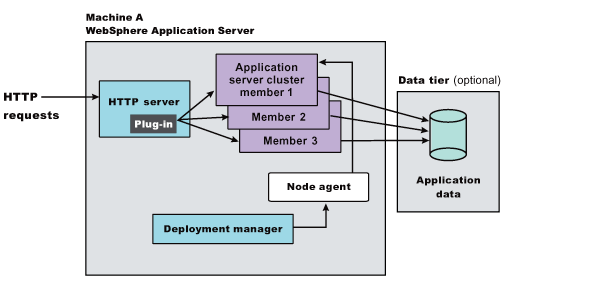
Vertical scaling refers to setting up multiple application servers on one machine, usually by creating cluster members.


This topology illustrates a simple vertical scaling example, with multiple cluster members of an Application Server on Machine A. You can also implement vertical scaling on more than one machine in a configuration. Combine vertical scaling with other topologies to boost performance and throughput.

Typical use

Vertical scaling offers the following advantages:


Increased processing power efficiency. An instance of an application server runs in a single Java virtual machine (JVM) process. However, the inherent concurrency limitations of a JVM process prevent it from fully utilizing the processing power of a machine. Creating additional JVM processes provides multiple thread pools, each corresponding to the JVM process associated with each Application Server process. This correspondence avoids concurrency limitations and lets the Application Server use the full processing power of the machine.
Load balancing. Vertical scaling topologies can use the WebSphere Application Server workload management facility.
Process failover. A vertical scaling topology also provides failover support among Application Server cluster members. If one Application Server instance goes offline, the other instances on the machine continue to process client requests.

Single machine vertical scaling topologies have the drawback of introducing the host machine as a single point of failure in the system. Vertical scaling on multiple machines avoids the single point of failure.

Instructions

To set up a vertical scaling topology, use the administrative console to configure a set of Application Server cluster members that reside on the same machine.

It is recommended that you plan vertical scaling configurations ahead of time. However, because vertical scaling does not require any special installation steps, you can implement vertical scaling whenever it is needed.

While you are deciding how many cluster members to create on a machine, take these factors into account:

The design of the application. Applications that use more components require more memory, limiting the number of cluster members you can run on a machine.
The hardware environment. Vertical scaling works best with plenty of memory and processing power. Eventually there is a point of diminishing returns on any machine, where the overhead of running more cluster members cancels out the benefits of adding them.

The best way to ensure good performance in a vertical scaling configuration is to tune a single instance of an Application Server for throughput and performance, then incrementally add cluster members. Test performance and throughput as you add each cluster member. Always monitor memory use when you are configuring a vertical scaling topology, so you do not exceed available physical memory on the machine.


--------------------------------------------------------------------------------

Garbage Collector

As the system runs, various Java objects are created. Some of these objects are
long-lived, and some are not. The ones that are not become de-referenced, which
means that the JVM no longer has a link to them because they have ceased to be useful.

These may be variables that were used for methods which have already returned
their values, objects retrieved from the database for a user that is no longer logged
on, or a host of other things. These objects sit in memory and fill up the heap space
until the JVM decides it's time to clean them up.

Normally, when garbage collection (GC) runs, it stops all processing in the JVM
while it goes through the heap looking for dead objects. Once it finds them, it frees up the memory they were taking up, and then processing can continue. If this happens in a server environment, it can slow down the processing of requests, as all processing comes to a halt while GC is happening.

There are some JVM switches that you can enable which can reduce the amount
of time processing is halted while garbage collecting happens. These can improve the
performance of your Liferay installation if applied properly. As always, you will need to use a profiler to monitor garbage collection during a load test to tune the numbers properly for your server hardware, operating system, and application server.
The Java heap is divided into sections for the young generation, the old generation,
and the permanent generation. The young generation is further divided into
three sections: Eden, which is where new objects are created, and two “survivor
spaces,” which we can call the From and To spaces.

Garbage collection occurs in stages. Generally, it is more frequently done in the
young generation, less frequently done in the old generation, and even less frequently done in the permanent generation, where long-lived objects reside. When garbage collection runs in the young generation, Eden is swept for objects which are no longer referenced. Those that are still around are moved to the “To” survivor space, and the “From” space is then swept. Any other objects in that space which still have references to them are moved to the “To” space, and the “From” space is then cleared out altogether. After this, the “From” and the “To” spaces swap roles, and processing is freed up again until the next time the JVM determines that garbage collection needs to run.

After a predetermined number of “generations” of garbage collection, surviving
objects may be moved to the old generation. Similarly, after a predetermined number
of “generations” of garbage collection in the old generation, surviving objects may be moved to the permanent generation.By default, the JDK uses a serial garbage collector to achieve this. This works very well for a short-lived desktop Java application, but is not necessarily the best performer for a server-based application like Liferay. For this reason, you may wish to switch to the Concurrent Mark-Sweep (CMS) collector.

Rather than halting application processing altogether, this garbage collector
makes one short pause in application execution to mark objects directly reachable
from the application code. Then it allows the application to run while it marks all objects which are reachable from the set it marked. Finally, it adds another phase called the remark phase which finalizes marking by revisiting any objects modified while the application was running. It then sweeps through and garbage collects. This has the effect of greatly reducing the amount of time that execution needs to be halted in order to clean out dead objects. Just about every aspect of the way memory management works in Java can be tuned. In your profiling, you may want to experiment with some of the following settings to see if any of them can increase your performance.NewSize, MaxNewSize: The initial size and the maximum size of the New or
Young Generation.


+UseParNewGC: Causes garbage collection to happen in parallel, using multiple
CPUs. This decreases garbage collection overhead and increases application throughput.

+UseConcMarkSweepGC: Use the Concurrent Mark-Sweep Garbage Collector.
This uses shorter garbage collection pauses, and is good for applications that have a
relatively large set of long-lived data, and that run on machines with two or more
processors, such as web servers.

+CMSParallelRemarkEnabled: For the CMS GC, enables the garbage collector to
use multiple threads during the CMS remark phase. This decreases the pauses during
this phase.

ServivorRatio: Controls the size of the two survivor spaces. It's a ratio between
the survivor space size and Eden. The default is 25. There's not much bang for the
buck here, but it may need to be adjusted.

ParallelGCThreads: The number of threads to use for parallel garbage collection.
Should be equal to the number of CPU cores in your server.

A sample configuration using the above parameters might look something like
this:
JAVA_OPTS="$JAVA_OPTS -XX:NewSize=700m -XX:MaxNewSize=700m -Xms2048m
-Xmx2048m -XX:MaxPermSize=128m -XX:+UseParNewGC -XX:+UseConcMarkSweepGC -XX:
+CMSParallelRemarkEnabled -XX:SurvivorRatio=20 -XX:ParallelGCThreads=8"

Thursday, July 15, 2010

Some on the fly thoughts

This post is called on the fly thoughts because

Along with expectation is understanding.

Trust doesn't mean to beg.. trust means to be worthy enough.

we need to learn and we need to identify where and what needs to be done at which place.

Sunday, July 11, 2010

Optimizing Liferay

Liferay Performance Tweaks

The aim of this article is to collect performance enhancing tweaks,tips and techniques.
##Lucene Search
#Set the following to true if you want to index your entire library of files on startup. index.on.startup=false


General performance

System.properties;
# The layout cache filter will cache pages to speed up page rendering for # guest users. See ehcache.xml to modify the cache expiration time to live. com.liferay.portal.servlet.filters.layoutcache.LayoutCacheFilter=true
Saves some 50Kb on every page but portlet look-feel modification is not possible for all (including (Omni)Admin)

## Portlet CSS Portlet # Set this to true to enable the ability to modify portlet CSS at runtime # via the Look and Feel icon. Disabling it can speed up performance. portlet.css.enabled=false

JAVASCRIPT

Not needed scripts could be expunged here. But the fattest of them all jQuery is needed almost always

## JavaScript

# Set a list of JavaScript files that will be loaded programmatically in # /html/common/themes/top_js.jsp.

# The ordering of the JavaScript files is important. Specifically, all # JQuery scripts should go first. # # The Liferay scripts are grouped in such a way, that the first grouping # denotes utility scripts that are used by the second and third groups. The # second grouping denotes utility classes that rely on the first group, but # does not rely on the second or third group. The third grouping denotes # modules that rely on the first and second group. # javascript.files= .....

Setting this will improve download time, but tweaks above are probably unused

## JavaScript # Set this property to true to load the combined JavaScript files from the # property "javascript.files" into one compacted file for faster loading for # production. Set this property to false for easier debugging for # development. You can also disable fast loading by setting the URL # parameter "js_fast_load" to "0". javascript.fast.load=true

CSS

## Theme # Set this property to true to load the theme's merged CSS files for faster # loading for production. Set this property to false for easier debugging # for development. You can also disable fast loading by setting the URL # parameter "css_fast_load" to "0". theme.css.fast.load=true

RESOURCES

Get your images and other resources from your personalised theme or even an HTTP server alias like www.liferay.org/resources/ Resources uploaded in Liferay are being served-up from database and will always be slower than using this strategy. especialy for recurring enterprise logo's and all.

THEMES

If you need a high performing landing-page and other pages you could consider creating a special theme for these pages.

VELOCITY CACHING

# Set this to true in production so that VM templates are cached velocity.engine.resource.manager.cache.enabled=true

CSS

Hack removing ALL CSS

edit templates\portal_normal.vm;

#if ( $is_signed_in ) #css ($css_main_file) #end

JAVASCRIPT

Hack removing ALL scripts en catching script exceptions LR 4.3.4

edit templates\portal_normal.vm;

#if ( $is_signed_in && ($permissionChecker.isOmniadmin() ) ) $theme.include($top_head_include) #else #end

#css ($css_main_file)

#if ( $is_signed_in && ($permissionChecker.isOmniadmin() ) ) #js ($js_main_file) #end

only use $is_signed_in for all signed in users/admin's

$is_signed_in

Database

MySQL:

Links to useful references:

· A good sample my.cnf:http://www.theadminzone.com/forums/showthread.php?t=8150

· Optmization, understanding mysql:http://www.mysqlperformanceblog.com/files/presentations/UC2005-Advanced-MySQL-Performance-Optimization.pdf

· MySQL Performance Tuning Primer Script: http://day32.com/MySQL/

Browser

Firefox

If you're serving content using SSL, open the URL

about:config

Locate the value:

browser.cache.disk_cache_ssl

Double-click to set value to true

Without this setting, each and every page load will reload all the images and CSS, making pages load about 5 times slower.

Application Server

WebSphere:

Enable Servlet Caching & Dynamic Caching.

Dynamic Caching:

http://publib.boulder.ibm.com/infocenter/wasinfo/v6r1/index.jsp?topic=/com.ibm.websphere.express.doc/info/exp/ae/tdyn_enablecache.html

Servlet Caching:

http://publib.boulder.ibm.com/infocenter/wasinfo/v5r1''index.jsp?topic=/com.ibm.websphere.zseries.doc/info/zseries/ae/tdyn_servletcaching.html''

Optional: Create a cachespec.xml to cache dynamic content:

http://publib.boulder.ibm.com/infocenter/wasinfo/v7r0/index.jsp?topic=/com.ibm.websphere.express.doc/info/exp/ae/tdyn_dynamiccacheconfig.html(Without a cachespec.xml only static content is cached, but are there any dynamic jsps with a constant static output?)

But be careful, these settings need a powerful Application Server.

Improvement: Approxamately 50% faster

Probably this works also with other Application Servers like Tomcat...

To enable Caching of Journals

1) access database as portal user

2) perform the following query:

update JournalTemplate set cacheable = 1; (this is for MySQL,
the 'cacheable' column of the JournalTemplate is a boolean field. Make
sure it has a value which returns "true" for your DB.)

The default site content provided with the stock 5.0.0 portal was
defective in that none of the Journal Templates were set to use caching,
so performance was horribly slow. This affects the portal running on any
DB.

TWEAKING portal-ext.properties

First, we're going to go edit the portal-ext.properties file. You know it... It gets tweaked out the wazoo in order get your instance running like you want it, so you should know where to find it. If you don't have one yet, you will HAVE to create it. Just open up a text editor and make one. It goes in .../liferay-bundle/tomcat_version/webapps/ROOT/WEB-INF/classes directory. You can subsitute the bundle and version in the file path and the ... for your particular installation. This section will be same regardless of operating system.

NOTE: It's fairly important that you understand that these things go into the TOP of your portal-ext.properties. We have seen some tiny performance gains by placing them in the very TOP of the file, so location within the portal-ext.properties does seem to matter.

Stuff you need to put in your file will be show in italics.

First, be sure you declare you host name explicity. It seems to speed things up if the server doesn't have to figure out who it is. This should be the very first entry in your file. You will need to know your Fully Qualified Domain Name (FQDN). If you don't, get it from your network administrator. If you're not sure what it is, Google is your friend. DNS is beyond the scope of this document.

#Set the Host name
web.server.host=my.fqdn.hostname

Next, you're going to set your database connection stuff. This should be the SECOND thing in your file. Note: You will only use the IP address if you've set your MYSQL instance to accept network connections. Otherwise it will simply be localhost.

#MySQL Options
jdbc.default.driverClassName=com.mysql.jdbc.Driver
jdbc.default.url=jdbc:mysql://my.i.p.address.here/lportal?useUnicode=true&characterEncoding=UTF-8&useFastDateParsing=false
jdbc.default.username=mydatabaseuser
jdbc.default.password=mydatabasepassword

Unless you REALLY need it, turn off the Hibernate stuff

#Turn off Hibernate Stuff
hibernate.bytecode.use_reflection_optomizer=false
hibernate.cache.use_minimal_puts=false
hibernate.cache.use_query_cache=false
hibernate.cache.use_second_level_cache=false
hibernate.cache.use_structured_entries=false

Now, we get to the real meat here - setting the stuff that will give you the MOST performance boost. With the exception of the theme.css.fast.load and theme.images.fast.load, you can set them to what you for your server. However, this should be the THIRD thing in your file.

#Set Up Some Performance Tags
theme.css.fast.load=true
theme.images.fast.load=true
theme.portlet.decorate.default=true
theme.porlet.sharing.default=true
portlet.css.enabled=false

NOTE: If you want to do any kind of virtual hosting via an Apache front-end, now is a *really* good time to configure your context. You'll want to do that before you get started really adding pages to Liferay. Otherwise, if you decide to do it later, you'll be changing all of your links, URL pages, etc.

Be sure to add this to your portal-ext.properties files. Keep in mind you can change /portal to anything that strikes your fancy. I'm just using this as an example.

portal.ctx=/portal

The reason for this is that when you add a context other than the "ROOT" it changes the URL. Instead of www.myserver.com:8080/web/guest, you would have www.myserver.com:8080/portal/web/guest.

Ok, save the porlet-ext.properties and keep rolling

TWEAKING TOMCAT

First, you will want to make sure that you have the tomcat native libs installed. You can get this as a package from the repository. It is in backports as I recall. Edit your /etc/apt/sources.list so that you can get the backports. I'm not going to put directions here on how to do that. You can Google for it.

sudo aptitude install libtcnative1

That will install it for you. That results in a really modest performance gain but all this stuff is cumulative. We keep shaving a little here and a little there and pretty soon it all adds up to a nice performance bonus.

NOTE: On some systems, you will need to disable IPV6 networking. If you actually need the IPV6 stuff, you will want to build and install the Tomcat libs from source and not use the Ubuntu package. Failure to start with IPV6 enabled is a known issue with the Ubuntu package.

Next we go edit the server.xml. Make a copy before you start editing, just in case. The stuff that's already in your file will be underlined and the stuff that we're replacing it with will be in italics.

sudo cp server.xml server.1

It's always good system administration practice to keep incremental copies of configuration files so that you can roll back easily if you accidentally create a problem.

Now we're going to edit it. Somewhere around line 68 you'll see...


connectionTimeout="20000"
redirectPort="8443" URIEncoding="UTF-8" />

We're going to replace that with....


maxHttpHeaderSize="8192"
maxSpareThreads="75"
enableLookups="false"
acceptCount="100"
loadTimeout="true"
connectionTimeout="20000"
redirectPort="8443"
URIEncoding="UTF-8" />

Now save that and we're done here... NOTE: You can change the "acceptCount" but if you do, keep track of that number since

TWEAKING DATABASE MYSQL

Find your key_buffer and set it to 20% of your physical RAM. That DOES NOT include swap space or anything other than RAM.

Set your max_allowed_packet to at least 16MB if it isn't already.

Set your max_connections to what ever you have in your server.xml for accept count. In our case, that's 100.

Set your table_cache to at least 64 if its not already there.

Save that and restart mysql.


http://www.liferay.com/community/wiki/-/wiki/Main/Performance

1. http://www.liferay.com/community/forums/-/message_boards/message/392862

2. http://www.liferay.com/web/shuyang.zhou/blog/-/blogs/liferay-performance-tuning

3. http://www.kanonbra.com/index.php/projects/various/performance-testing/15-performance-testing/14-liferay-runtime-performance-on-dual-and-quad-core-cpus

4. http://www.kanonbra.com/index.php/projects/performance-testing/18-using-visualvm-on-liferay

5. http://www.liferay.com/community/wiki/-/wiki/Main/Fine+tune+the+performance+of+the+system

6. http://www.liferay.com/web/michael.han/blog/-/blogs/1321749/maximized?p_p_auth=H8hIL70y

WAS concepts : node, cell ,cluster

A good explanation of cell node and cluster is provided in the below given link  https://itdevworld.wordpress.com/2009/05/03/websphere-c...